Back to home

Geofencing for real-time emergency response

ENTERPRISE · PUBLIC SECTOR · DESKTOP APP

Summary

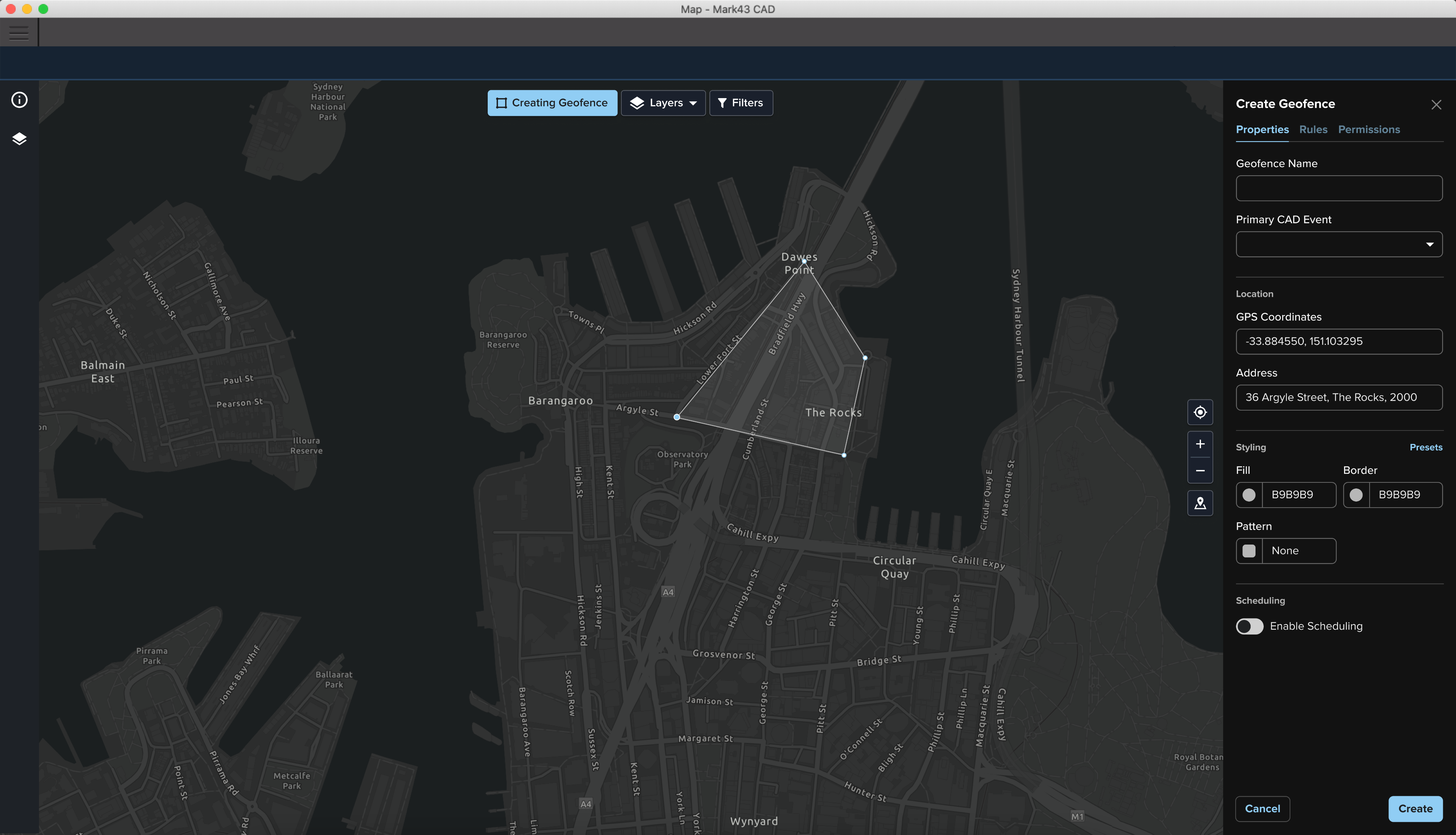
At Mark43 I led the design of a greenfield geofencing feature within our Computer-Aided Dispatch (CAD) platform, enabling dispatchers to define areas of interest and automate responses during active incidents.

This work was critical for Mark43’s international expansion and compliance with public safety standards, while also addressing a major operation pain point in excessive radio noise and lack of other coordination tools.

Over 6 months I led research across urban and regional police forces, designed a flexible mapping-based system, and validated the solution through multiple rounds of testing. The feature was successfully release to live customers/agencies, achieving strong adoption and positive feedback from stakeholders.

What were we trying to fix?

In high pressure situations like pursuits, major events (terror attacks, bomb threats), or missing persons, teams (units, dispatchers) need to coordinate across a wide area. Until now this was being done manually:

  • Over radio communication
  • Using physical maps and markers

This created major issues where:

  • ~80% of radio chatter was irrelevant to most responders
  • High cognitive load for dispatchers
  • Slow coordination across units
  • General increased risk fo miscommunication

And additionally not having this new functionality was a blocker for some commercial deals as it’s required to meet new APCO standards.

Understanding real-world workflows

To solve for this greenfield problem we had to first understand the existing workflow. We conducted:

  • Field research across NSW (urban and regional) and a number of agencies in the US
  • 1:1 interviews, ride-alongs, and workshops

Designing for speed and accessibility

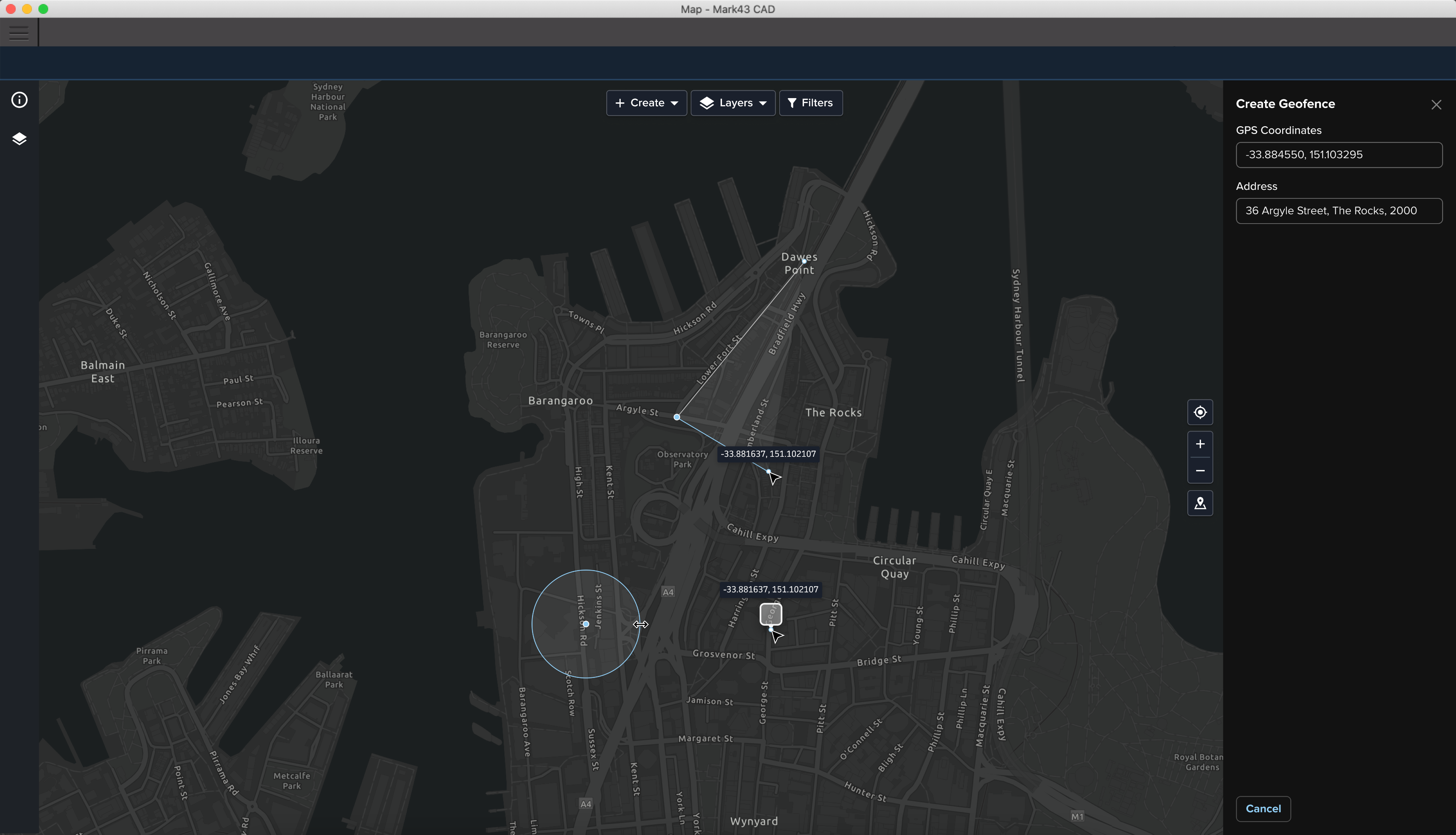
Creating or editing a geofence is often time-sensitive, so the experience needed to be accessible from anywhere within the CAD system. For this reason I integrated geofencing directly into existing map workflows which allowed users to move fluidly between incident/event management and the spatial tooling without switching contexts.

The maps in CAD are also the primary source of situational awareness, so it was critical that geofences added context without blocking other important content.

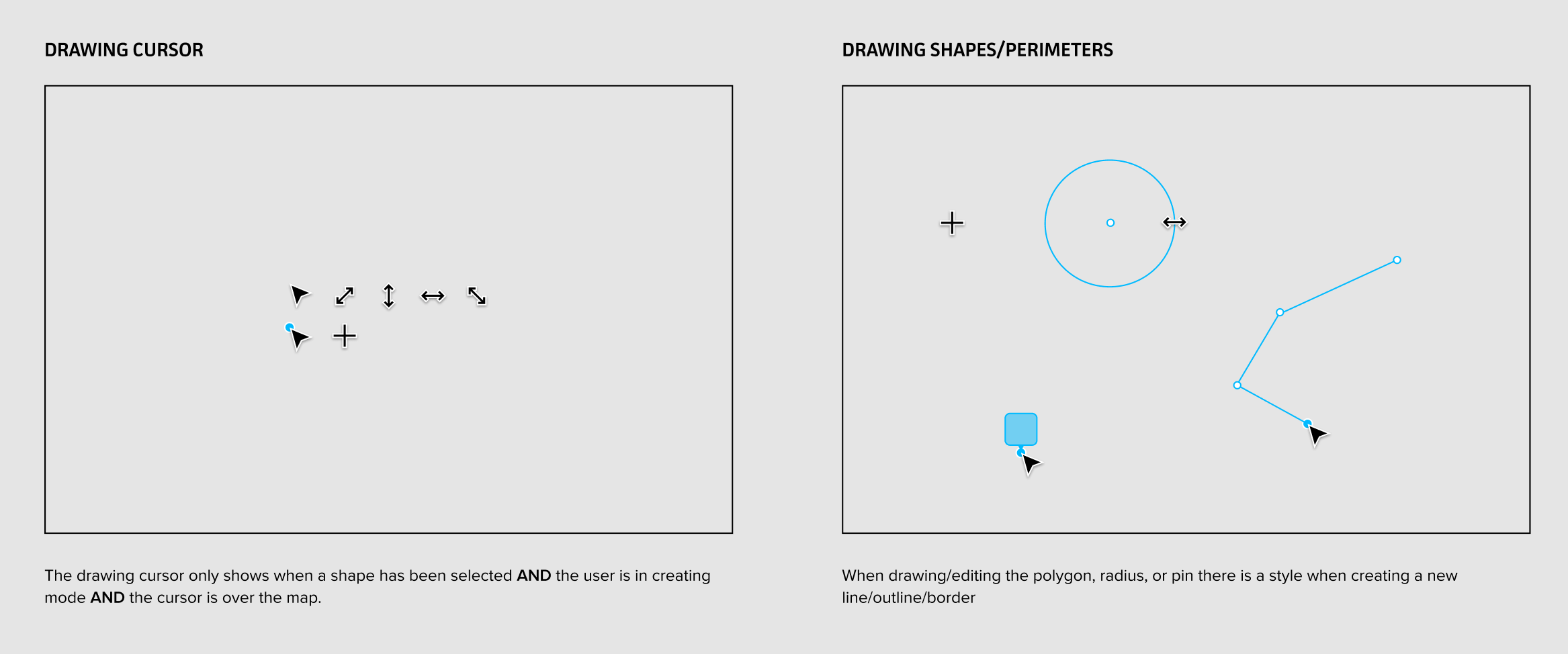
I designed a layered visual system that allowed geofences, live data, and other map elements to coexist clearly, with careful attention to styling, hierarchy, and visibility.

Simplifying complex rule systems

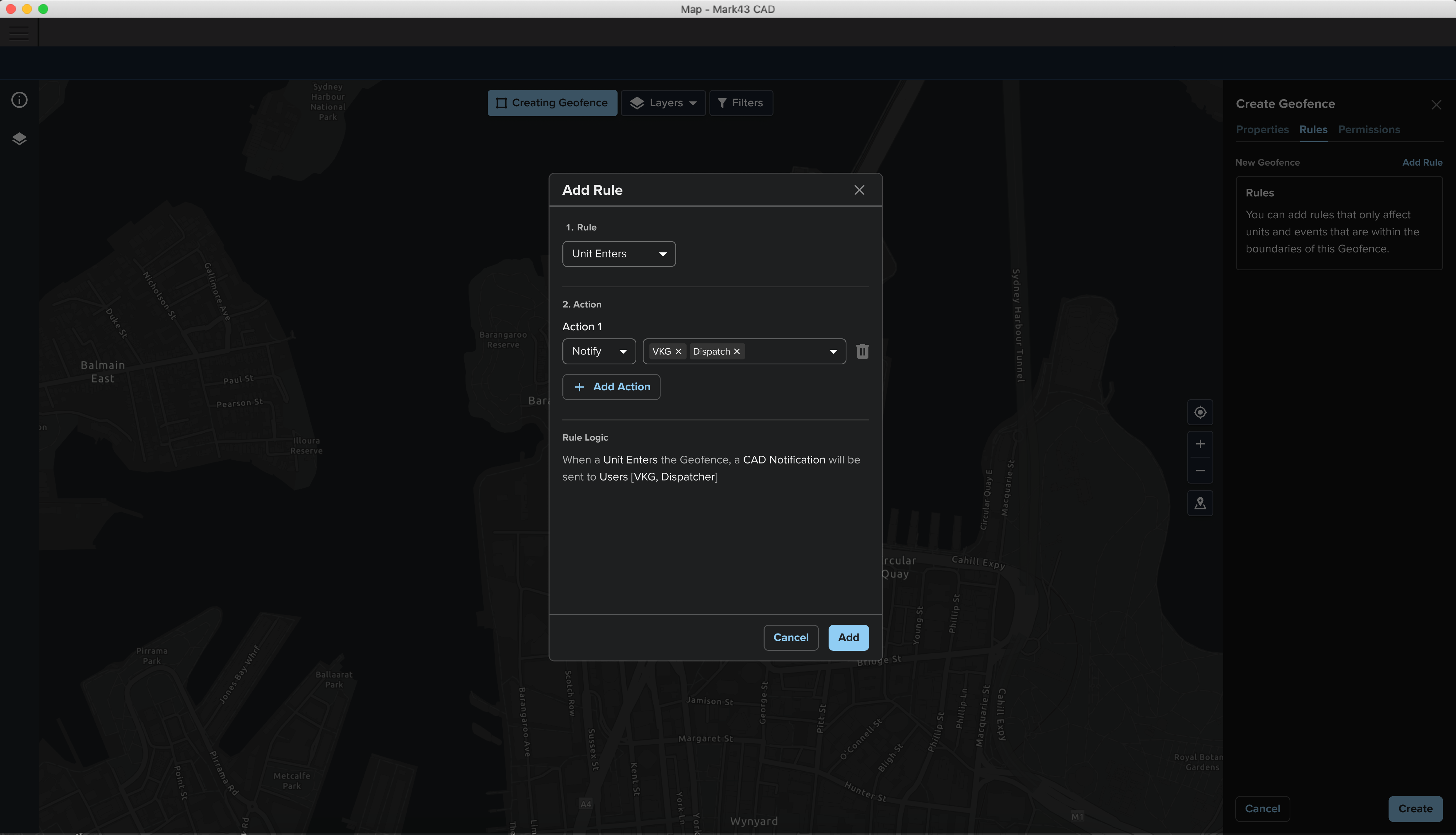
A key feature of triggering geofences involved rule-based automation but traditional boolean logic proved difficult for most users to understand and configure.

We introduced a simplified rule model with clearer structure and supporting explanations, improving both learnability and usability without sacrificing core functionality.

Designing within technical constraints

To solve for this greenfield problem we had to first understand the existing workflow. We conducted:

  • Field research across NSW (urban and regional) and a number of agencies in the US
  • 1:1 interviews, ride-alongs, and workshops

Adoption and outcomes

The feature was successfully delivered within a 6-month timeframe and rolled out to live customers. I worked with CS and Sales during the EAP to socialise the changes to the workflows and spent ~4 weeks with the delivery team to iterate on feedback prior to general release.

Customers reported strong positive feedback from both existing and prospective customers, and the introduction of the feature increased competitiveness in enterprise and international deals.

Want to learn more?

CV/Resume

Linkedin

Email

Back to home

Geofencing for real-time emergency response

ENTERPRISE · PUBLIC SECTOR · DESKTOP APP

Summary

At Mark43 I led the design of a greenfield geofencing feature within our Computer-Aided Dispatch (CAD) platform, enabling dispatchers to define areas of interest and automate responses during active incidents.

This work was critical for Mark43’s international expansion and compliance with public safety standards, while also addressing a major operation pain point in excessive radio noise and lack of other coordination tools.

Over 6 months I led research across urban and regional police forces, designed a flexible mapping-based system, and validated the solution through multiple rounds of testing. The feature was successfully release to live customers/agencies, achieving strong adoption and positive feedback from stakeholders.

What were we trying to fix?

In high pressure situations like pursuits, major events (terror attacks, bomb threats), or missing persons, teams (units, dispatchers) need to coordinate across a wide area. Until now this was being done manually:

  • Over radio communication
  • Using physical maps and markers

This created major issues where:

  • ~80% of radio chatter was irrelevant to most responders
  • High cognitive load for dispatchers
  • Slow coordination across units
  • General increased risk fo miscommunication

And additionally not having this new functionality was a blocker for some commercial deals as it’s required to meet new APCO standards.

Understanding real-world workflows

To solve for this greenfield problem we had to first understand the existing workflow. We conducted:

  • Field research across NSW (urban and regional) and a number of agencies in the US
  • 1:1 interviews, ride-alongs, and workshops

Designing for speed and accessibility

Creating or editing a geofence is often time-sensitive, so the experience needed to be accessible from anywhere within the CAD system. For this reason I integrated geofencing directly into existing map workflows which allowed users to move fluidly between incident/event management and the spatial tooling without switching contexts.

The maps in CAD are also the primary source of situational awareness, so it was critical that geofences added context without blocking other important content.

I designed a layered visual system that allowed geofences, live data, and other map elements to coexist clearly, with careful attention to styling, hierarchy, and visibility.

Simplifying complex rule systems

A key feature of triggering geofences involved rule-based automation but traditional boolean logic proved difficult for most users to understand and configure.

We introduced a simplified rule model with clearer structure and supporting explanations, improving both learnability and usability without sacrificing core functionality.

Designing within technical constraints

To solve for this greenfield problem we had to first understand the existing workflow. We conducted:

  • Field research across NSW (urban and regional) and a number of agencies in the US
  • 1:1 interviews, ride-alongs, and workshops

Adoption and outcomes

The feature was successfully delivered within a 6-month timeframe and rolled out to live customers. I worked with CS and Sales during the EAP to socialise the changes to the workflows and spent ~4 weeks with the delivery team to iterate on feedback prior to general release.

Customers reported strong positive feedback from both existing and prospective customers, and the introduction of the feature increased competitiveness in enterprise and international deals.

Want to learn more?

CV/Resume

Linkedin

Email

Back to home

Geofencing for real-time emergency response

ENTERPRISE · PUBLIC SECTOR · DESKTOP APP

Summary

At Mark43 I led the design of a greenfield geofencing feature within our Computer-Aided Dispatch (CAD) platform, enabling dispatchers to define areas of interest and automate responses during active incidents.

This work was critical for Mark43’s international expansion and compliance with public safety standards, while also addressing a major operation pain point in excessive radio noise and lack of other coordination tools.

Over 6 months I led research across urban and regional police forces, designed a flexible mapping-based system, and validated the solution through multiple rounds of testing. The feature was successfully release to live customers/agencies, achieving strong adoption and positive feedback from stakeholders.
What were we trying to fix?

In high pressure situations like pursuits, major events (terror attacks, bomb threats), or missing persons, teams (units, dispatchers) need to coordinate across a wide area. Until now this was being done manually:

  • Over radio communication
  • Using physical maps and markers

This created major issues where:

  • ~80% of radio chatter was irrelevant to most responders
  • High cognitive load for dispatchers
  • Slow coordination across units
  • General increased risk fo miscommunication

And additionally not having this new functionality was a blocker for some commercial deals as it’s required to meet new APCO standards.
Understanding real-world workflows

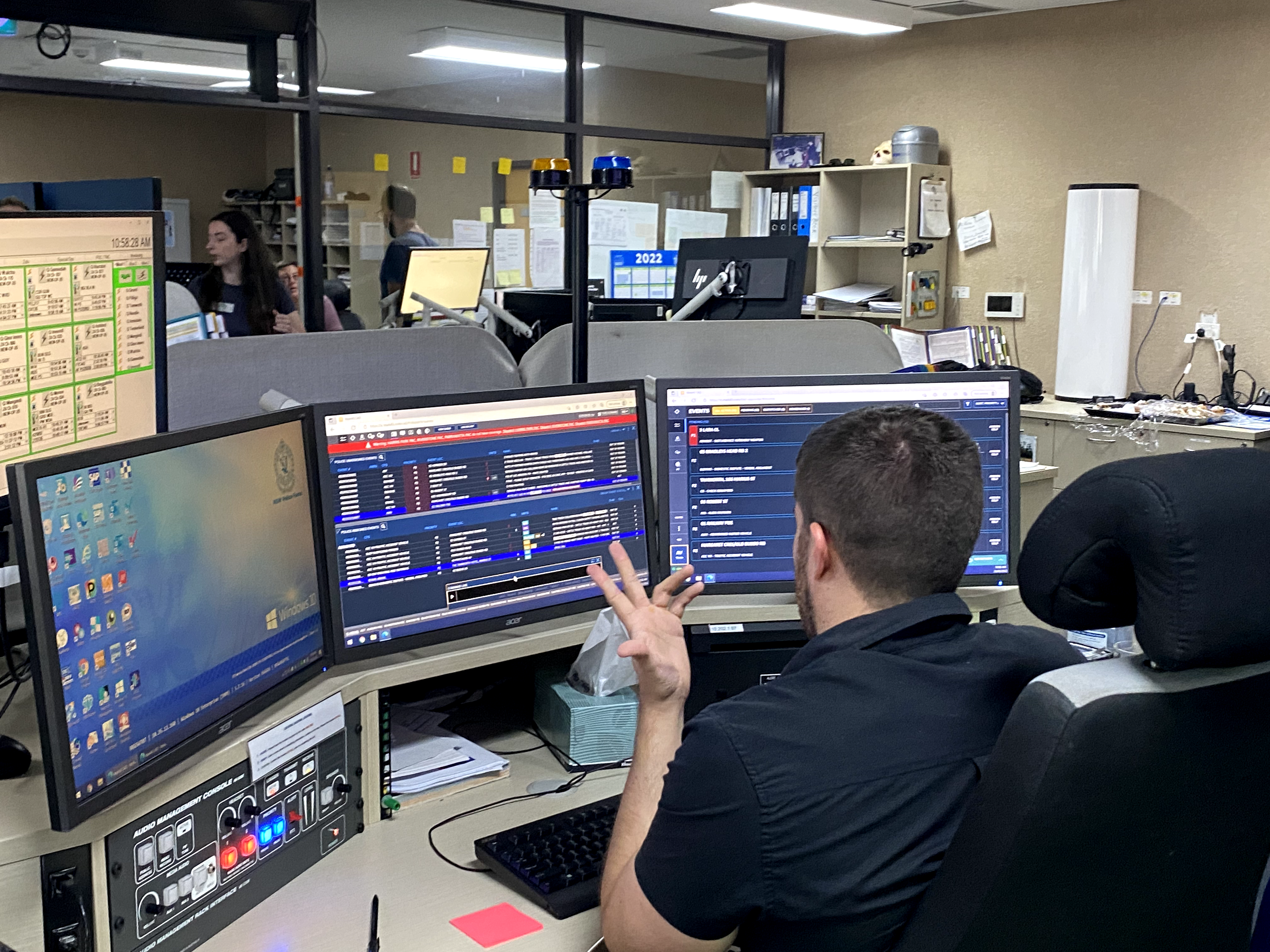
To solve for this greenfield problem we had to first understand the existing workflow. We conducted:

  • Field research across NSW (urban and regional) and a number of agencies in the US
  • 1:1 interviews, ride-alongs, and workshops with dispatchers and responders
  • Sit ins with observation of actual incident coordination

From this we found that users relied on multiple sources of map data to make decisions, and using a number of tools like radio, CAD, and physical. Precision was also key as addresses, relative distance, mattered more than visual approximation.

Designing for speed and accessibility

Creating or editing a geofence is often time-sensitive, so the experience needed to be accessible from anywhere within the CAD system. For this reason I integrated geofencing directly into existing map workflows which allowed users to move fluidly between incident/event management and the spatial tooling without switching contexts.

The maps in CAD are also the primary source of situational awareness, so it was critical that geofences added context without blocking other important content.

I designed a layered visual system that allowed geofences, live data, and other map elements to coexist clearly, with careful attention to styling, hierarchy, and visibility.

Simplifying complex rule systems

A key feature of triggering geofences involved rule-based automation but traditional boolean logic proved difficult for most users to understand and configure.

We introduced a simplified rule model with clearer structure and supporting explanations, improving both learnability and usability without sacrificing core functionality.

Designing within technical constraints

One of the key challenges was working within the constraints of our mapping stack (ESI/ArcGIS), which introduced both opportunities and limitations.

Early in the process, I collaborated closely with engineers and our mapping SMEs to:

  • Understand what functionality we could reuse
  • Identify performance and interaction constraints
  • Avoid over-investing in custom functionality with the tight timelines unless necessary

Adoption and outcomes

The feature was successfully delivered within a 6-month timeframe and rolled out to live customers. I worked with CS and Sales during the EAP to socialise the changes to the workflows and spent ~4 weeks with the delivery team to iterate on feedback prior to general release.

Customers reported strong positive feedback from both existing and prospective customers, and the introduction of the feature increased competitiveness in enterprise and international deals.